# Opal Run
Use the full TUI when you want to watch jobs live, inspect history, browse artifacts, and step through the pipeline interactively.
opal run

Opal is a terminal-first, AI-capable local runner for GitLab pipelines. It evaluates .gitlab-ci.yml, keeps local Git-aware behavior where it matters, and gives you fast ways to run, inspect, debug, and analyze jobs without pushing to a remote runner.
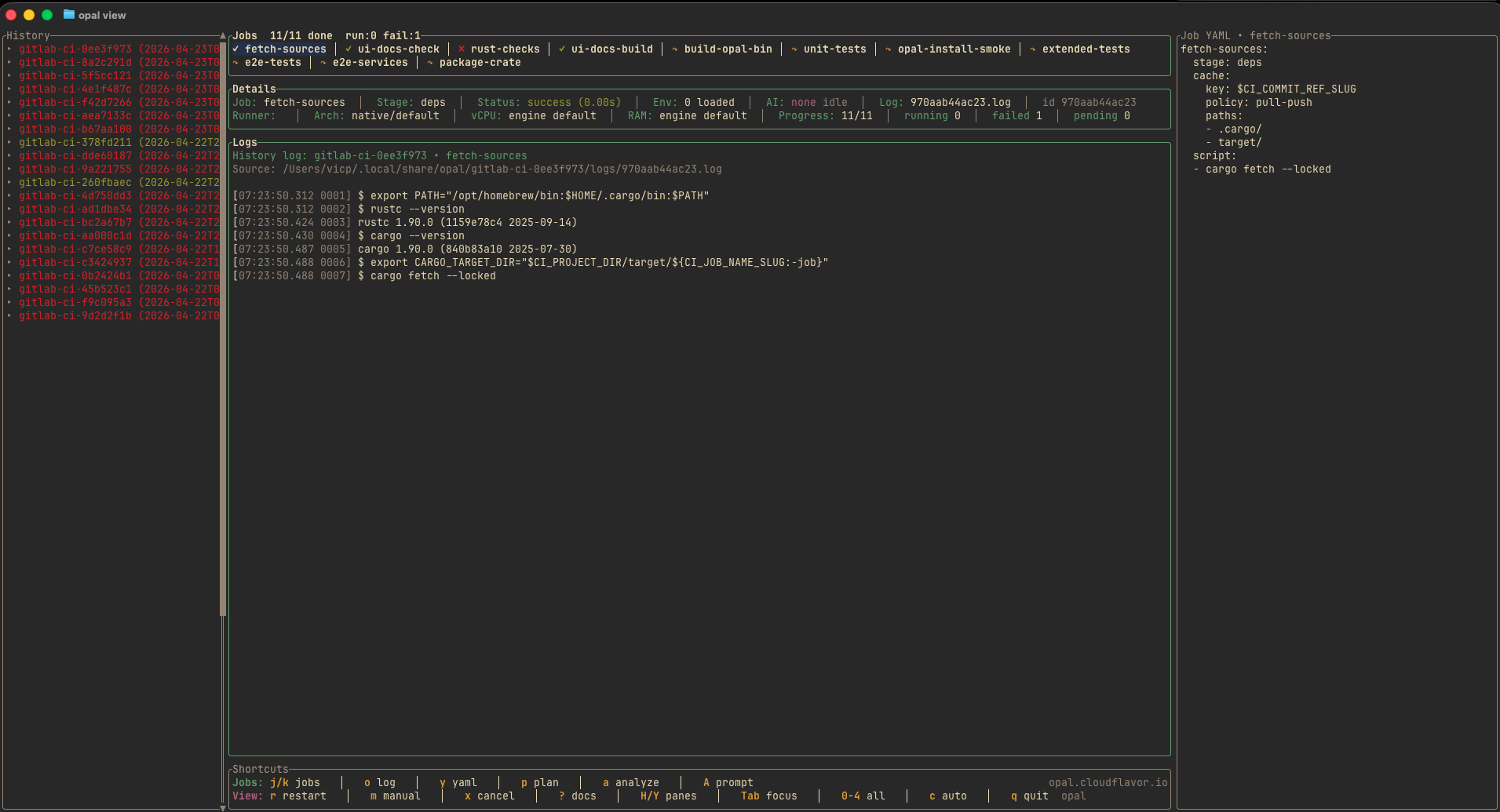
Run against the working tree you are actively editing instead of waiting on a remote runner.
Use interactive runs, plain terminal runs, DAG-only planning, or post-run history browsing depending on the task.
Analyze a selected job, preview the exact prompt Opal sends, and keep troubleshooting inside the same terminal workflow.
cargo install opal-cli
brew tap cloudflavor/tap
brew install cloudflavor/tap/opal-cli
Open install docs → · Browse Opal releases on GitHub ↗
For a prebuilt binary, choose macOS Apple Silicon, Linux ARM64 or Linux x86_64 from the selected release. Obtain its archive and checksums together upstream, verify before extracting, then place opal in a user-owned directory on your PATH. GitHub access permissions apply.
Use the full TUI when you want to watch jobs live, inspect history, browse artifacts, and step through the pipeline interactively.
opal run
Print the evaluated DAG, dependencies, gates, and scheduling decisions without starting containers.
opal plan
Use plain terminal mode for scriptable local checks, sharable terminal output, and CI-like runs without the interactive interface.
opal run --no-tui
Open prior run history, logs, artifacts, and cache metadata after the fact.
opal view
Analyze the selected job with the Codex backend, inspect the rendered prompt, and keep troubleshooting inside the TUI.
press a inside opal run
Analyze the selected job with the Ollama backend and stream the response directly into the TUI.
press a inside opal run
Original recordings from the Opal documentation, self-hosted here with asciinema-player 3.18.1 (Apache 2.0). Recording sources.
See the complete command-line surface, flags, environment variables, and common examples.
opal --helpOpen docs →
Analyze selected jobs with Codex or Ollama, inspect the exact rendered prompt, and keep troubleshooting inside the terminal.
a / A in the TUIOpen docs →
Configure the active AI backend, prompt template files, Ollama host/model settings, and Codex CLI command/model overrides.
.opal/config.tomlOpen docs →
Understand how Opal evaluates includes, rules, services, caches, artifacts, and local workspaces.
.gitlab-ci.ymlOpen docs →
Complete repository documentation: installation, workflows, configuration, and reference.
Opal executes GitLab-style CI pipelines locally so you can iterate without pushing to a remote runner. This documentation gives you the high-level tour of how the system is structured and where to look for specific topics.
cargo install --path crates/opal
cargo install --path crates/opal
This document describes how Opal interprets `.gitlab-ci.yml` and schedules jobs locally.
`opal plan` lets you explore the pipeline graph without spinning up containers. It uses the same parser and rule evaluation as `opal run`, so the output is a faithful preview of what will execute when you launch a real run.
Opal reads a layered `config.toml` to customize runtime behavior and automatically handle container registry authentication. Two locations are checked (later entries override earlier ones):
This page documents how to configure Opal's AI-assisted job troubleshooting backends, prompt files, and saved-analysis behavior.
This page tracks Opal's AI-assisted job troubleshooting feature.
This page tracks which `.gitlab-ci.yml` features Opal currently recognizes and how that compares with GitLab's official CI/CD YAML surface.
The Ratatui-based UI is optimized for keyboard navigation. This document complements the in-app shortcut list and explains each pane in detail.
This page documents the current Opal command-line surface directly from the implementation.
This document is meant to be handed to a coding agent such as Codex.
This page documents where Opal stores local state, how per-job workspaces are prepared, how cache and artifacts are laid out on disk, and how project-level `.opal` content interacts with global configuration.
Architecture and maintenance notes for Opal.
Documentation snapshot from https://github.com/cloudflavor/opal at revision 194af1f1fbef, not a current-release selector.